
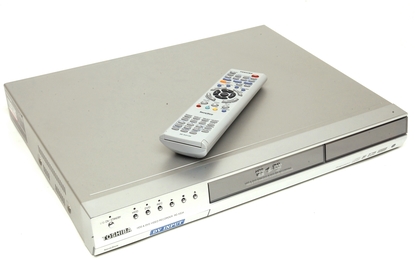
Toshiba RD-XS34 DVD Recorder with 160GB Hard Disk
Progressive scan playback. Packed with editing and recording features.
The RD-XS34SG is a feature-rich recorder that should appeal to videophiles
- DVD recorder and Personal Video Recorder with 160 GB hard drive; measures 17 x 2.5 x 13.25 inches (W x H x D)
- Interactive Program Guide provides an easy to read listing of the television programs available to view or record
- Records to DVD-RAM, DVD-R, DVD-RW; plays CD-R/RW and MP3/WMA digital audio formats
- One set of component (Y,Pr,Pb), 1 S-Video, and 1 RCA video outputs; Firewire input for connecting to video camcorders
- High-speed dubbing from the hard drive to disc without any deterioration of digital signal
Technical Details
Brand	Toshiba
Item Weight	8.62 Kg
Product Dimensions	43 x 6.2 x 33.4 cm
Item model number	RD-XS34
Batteries:	2 AA batteries required. (included)

Toshiba RD-XS34 DVD Recorder with 160GB Hard Disk pre-owned very good condition
with original box / manual / remote
PLEASE CONTACT FOR PRICING
Contact us for pricing
PLEASE CONTACT FOR MORE INFORMATION
Contact us for pricing
PLEASE CONTACT FOR MORE INFORMATION
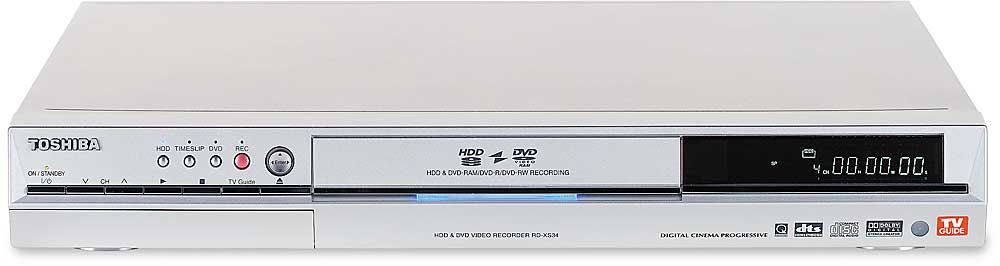
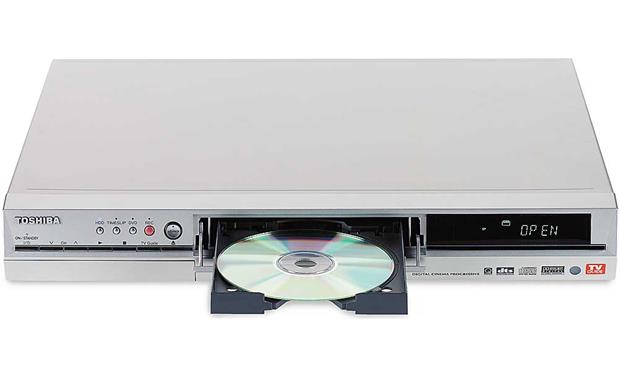
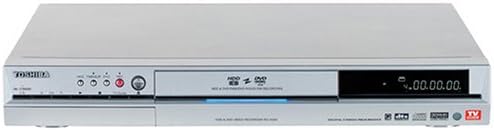
The RD-XS34's designers clearly went for a utilitarian look with the unit, as all of design is geared towards being useful, rather than particularly pretty. It's an average sized unit, measuring 430 x 58 x 333mm. In the middle of the unit sits the recessed drive tray, with function buttons and a hidden input panel to the left, and a simple LED display to the right. At the rear of the unit are connections for just about every input type, although it should be noted that if you're not using component video cables with the RD-XS34, you'll either have to buy an additional SCART to composite adaptor, or have composite cables snaking around to the front panel.
The remote that comes with the RD-XS34 is fully featured, and consequently quite terrifying to the first time user. We tested this theory with a number of test subjects, all of whom were left scratching their heads while they tried to work out how to start simple playback - let alone record to DVD or the internal hard disk drive. Once you get to grips with the remote, with its inbuilt steep learning curve, however, you'll find it handy to have absolutely everything at your fingertips at one time.
Features
The RD-XS34 boasts double the internal storage of its RD-XS32 predecessor, with a weighty 160GB internal hard drive. That'll give you up to 206 hours of recording time, although there is one minor catch here; the unit will only record in single blocks of eight hours each. For many users that won't be too much of an obstacle, but if you like recording long sporting events, or even program marathons on Foxtel, you'll have to do some careful stopping to record everything you want. It's also capable of recording to DVD-R, DVD-RW and DVD-RAM. Just as with the RD-XS32, DVD plus formats are not supported.
The depth of the RD-XS34's feature set becomes apparent when you first lift up the weighty 175-page manual, which covers everything that the unit can do in quite exhausting depth. To briefly cover the most interesting features, it's capable of progressive scan playback, can simultaneously play back and record, use timeslip to "pause" live TV, and edit and transfer files to and from rewriteable media and the internal hard drive. One nice feature of the editing suite - which, like the rest of the RD-XS34's feature set, is initially a bit baffling but quickly becomes second nature - is that there's a selection of menu themes for your created discs, and some of them are relatively clean and pleasant to look at.
Performance
One thing we noticed instantly with the RD-XS34 was that it's a noisy little unit. A certain quantity of noise is to be expected from a hard-drive equipped unit, but the internal fan on our test unit seemed louder than units we've previously tested. That's only likely to be a factor if you're using the RD-XS34 in a small space, however; in an average sized living room (like the one we tested in) once you step away from the TV and plonk yourself on the sofa, the noise becomes essentially inaudible.
We hit one noteable snag with recording to DVD media with the RD-XS34 (aside from the lack of multi-format support), and that came when recording to DVD-R media. The read/write laser in our test unit was very fussy indeed about which discs it did or didn't like, refusing some name brand discs straight out of the box. In some cases we were able to heavily polish the discs and get some joy out of them, but it's worth keeping in mind that the unit doesn't like discs that aren't as close to perfect as possible.
As previously mentioned, the RD-XS34 isn't the easiest unit to get to grips with, but that's as much a function of it being as feature rich as it is rather than any inherent design flaws. To its credit, most of the onscreen options are well explained once you find them; we'd still advise you to keep the product manual handy for a week or two, regardless.

Contact us for pricing
PLEASE CONTACT FOR MORE INFORMATION

stock picsContact us for pricing
PLEASE CONTACT FOR MORE INFORMATION

Contact us for pricing
PLEASE CONTACT FOR MORE INFORMATION
Inputs
RF Coaxial- x1
Composite Video - RCA x2
Audio L/R - RCA x2
S-Video - x2
IEEE 1394 DV - x1
Outputs
RF Coaxial (Tuner Pass-through) - x1
Audio L/R - RCA x2
Composite Video - RCA x1
S-Video - x1
Component Video - RCA x1
Optical Digital Audio- x1
Contact us for pricing
PLEASE CONTACT FOR MORE INFORMATION
Contact us for pricing
PLEASE CONTACT FOR MORE INFORMATION
160 GB Hard Drive
DVD-RAM/DVD-RW/DVD-R/CD/CD-R/CD-RW/MP3/WMA* Playback
Time Slip
Pause Live TV
Multi-Brand Remote Control
Easy Navigation
Camcorder Controls
TV Guide 2004
Instant Replay (10 seconds)
Commercial Skip
Digital Noise Reduction Recording
Mosquito Noise Reduction
Black Level Expansion
x8, x30, x100 Search
Slow Motion x1/2, x1/8, x1/16
IR Blaster
Fast Forward with Audio x1.5
Search Forward/Reverse x1.5, x8, x30, x100
Auto Clock
Auto 125 Channel Set-up
Auto Title Chapter/Thumbnail
Super Multi-Drive DVD-RAM/DVD-R/DVD-RW Recorder
* CD/CD-RW discs recorded by CD-DA method can be played back. Some CD/CD-RW discs may be incompatible due to laser pick-up and disc design. DVD-R discs recorded by DVD Video method can be played. Some DVD-R discs may be incompatible due to laser pick-up and disc design. MP3 and JPEG discs may be incompatible due to different recording format or condition of disc.
JPEG Viewer

Connections
Front Panel A/V & IEEE1394 DV Inputs
RF Input
RF Output
Optical Digital Output
Front S-Video Input
ColorStream Pro™ Component Video Output
S-Video Output
S-Video Input
Composite Video Output
Composite Video Input
Analog Audio Input
Analog Audio Outputs
Audio
Dolby Digital Recording (2 CH)
Relay Recording
High Speed Dubbing
Spatializer Virtual Surround Sound
24 bit/192khz PCM Audio Compatibility
Dolby Digital Compatible
DTS Compatible
MTS/SAP
3D Virtual Surround Sound (Q-Sound)
Features
Progressive Scan
JPEG Viewer
* CD/CD-RW discs recorded by CD-DA method can be played back. Some CD/CD-RW discs may be incompatible due to laser pick-up and disc design. DVD-R discs recorded by DVD Video method can be played. Some DVD-R discs may be incompatible due to laser pick-up and disc design. MP3 and JPEG discs may be incompatible due to different recording format or condition of disc.
Instant Replay
Commercial Skip
Super Multi-Drive
Chase TV
Pause Live TV
Multi-Brand Remote Control
Easy Navi
160 GB Hard Drive
DVD/DVD-RAM/DVD-R/CD/CD-R/CD-RW/VCD/SVCD/MP3/WMA* Playback
TV Guide® Interactive Program Guide
Video
3D Video Digital Noise Reduction
10 bit/54 MHz Video D/A conversion with high resolution filter
Progressive Scan
Toshiba RD-XS34 Overview
Toshiba's DEMO RD-XS34 Multidrive Multiformat DVD Recorder with 160 GB Hard Drive provides you two convenient recording choices. You can record your video content either to the hard disk or to the DVD discs (DVD-RAM, DVD-R or DVD-RW). The RD-XS34 also takes the role of a player for many different media formats such as DVD-Video, Video CD, and CD-R and CD-RW discs with recorded MP3 and WMA files.
The RD-XS34 comes with several features including high-speed dubbing and the TV Guide on Screen Interactive Program Guide (IPG). Use the IPG for 8-day program listing. The recorder has a time-slip recording and playback feature that allows you to watch a recording that is already in progress.
The hard disk can store up to 135 hours of video content, depending on the quality you choose. The DVD recorder also has one IEEE-1394 DV input to connect and store video content from a DV camcorder. If necessary, use the recorder's IR blaster to control a cable box.
Recordable Hard Disk
Record your favorite video content in the hard disk. You can now enjoy several convenient features of hard disk recording such as instant access to content, extended recording time, and improved audio and video quality. The 160 GB hard disk can record up to 135 hours of video content (depending on the selected recording quality).
Recordable DVD Media
Record your favorite video content on the DVD-RAM, DVD-R and DVD-RW discs. Use MPEG-2 digital video format for stunning quality. This DVD recorder also features high-speed dubbing from the hard disk to the DVR-RAM and DVR-R.
Media Playback
Plays video content recorded from the Hard Disk as well from the DVD-RAM, DVD-R and DVD-RW discs. You can also enjoy recorded compact disc with MP3 or WMA playback. The RD-XS34 also allows you to enjoy JPEG source or a Video CD.
Time Slip Recording and Playback
Allows you to record programs ahead of your availability. It then allows you to play back the missed part while recording the next segment of the program. You can also pause live TV at a certain moment and come back later to watch from the same moment. Instant replay of TV programming is also possible.
Progressive Scan Component Video Output
Use D-R4's component-video output to feed high-quality video signal to your TV. If your TV supports the more stable and flicker-free progressive scan, image quality is further enhanced due to higher resolution (compared to interlaced video).
Front Panel A/V and IEEE I394 DV Input Terminal
In addition to RCA composite video, and RCA L/R audio inputs at the front panel, this DVD recorder has one IEEE I394 DV input terminal to connect and store video content from a DV Camcorder.
3-2 Pulldown
Your TV can now display video programs originally shot on 24 frames per second, which includes most film-based content.
IR Blaster for Cable Boxes
Use the IR blaster to control compatible cable boxes. IR blaster is a cable with infrared transmitter at one end. You connect the other end to the back of the Toshiba recorder.
EASY NAVI Menu
Experience the convenience of EASY NAVI menu. You can now have access to key features of the recorder, including feedback in regard to the status of the recorder. A live action window is the center piece of the EASY NAVI menu portal.
Auto Title/Chapter/Thumbnail Creation
Manage your video content with the help of a menu that is created when you record. The menu displays the channel and date, as well as a thumbnail of your video content. In addition to assigning a 64-character title, you can also create chapters, either at predetermined intervals or at specific points you determine within your recording.
TV Guide on Screen
You can now record easily with TV guide on-screen interactive program guide. It allows you to browse program listings or perform keyword searches to locate desired programs.
Toshiba RD-XS34 DVD Recorder with 160GB Hard Disk pre-owned / low hours of work/ clean in very good condition with original box / manual / remote
- Product Code: Toshiba RD-XS34 DVD Recorder with 160GB Hard Disk
- Availability: 2-3 Days
-
$0.00